How to Properly Design Firebase FCM Push Notifications for Multi-Device Apps
Push notification issues such as duplicate alerts or devices not receiving messages usually stem from poor backend token management, not from Firebase itself.
This guide explains the correct way to design a scalable, multi-device push notification system using Firebase Cloud Messaging (FCM).
The Real Problem
Most push notification failures happen because of backend design mistakes, such as:
- Only one device token is stored per user
- Old tokens not removed
- Duplicate tokens saved
- Invalid tokens were not cleaned
- Notifications sent synchronously inside API requests
These issues lead to duplicate alerts, missed notifications, and poor scalability.
The Correct Architecture
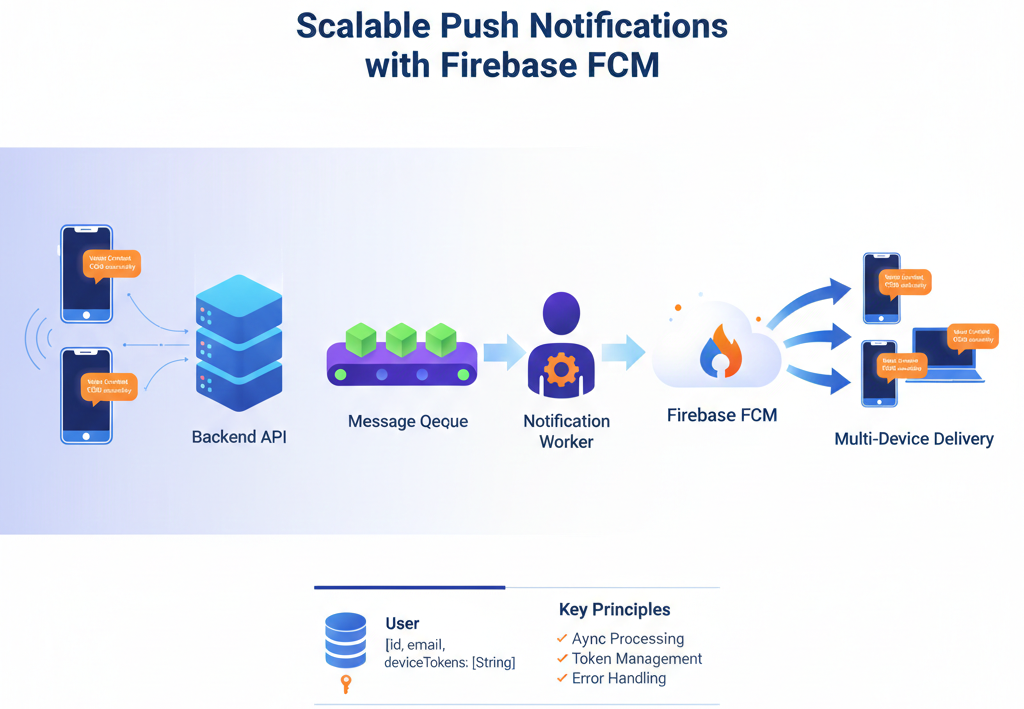
A proper, production-ready push system should follow this structure:
Mobile App → Backend → Queue → Notification Service → FCM → Device
Key principle: Never send push notifications directly inside the main API request.
Instead, use queue-based background processing to handle notifications asynchronously. This improves reliability, performance, and scalability.
Correct Database Design
User {
  id
  email
  deviceTokens: [String]
}
Why this matters:
Users often log in from multiple devices (phone, tablet, web, etc.). If you store only one token per user, multi-device notifications will break.
Proper Token Handling
1. On Login
if (!user.deviceTokens.includes(newToken)) {
   user.deviceTokens.push(newToken)
}
2. On Logout
fuser.deviceTokens = user.deviceTokens.filter(
   token => token !== logoutToken
)
3. On Firebase Errors
- Invalid token
- Not registered
Sending Notifications
sendMulticast({
   tokens: user.deviceTokens,
   notification: {
     title: "Wallet Credited",
     body: "₹500 added successfully"
   }
})
For Production Scale
- Send to a maximum of 500 tokens per batch
- Use queues
- Process notifications in background workers
- Retry failures intelligently
Why This Architecture Works?
This approach:
- Prevents duplicate notifications
- Fixes missing deliveries
- Supports multi-device logins correctly
- Scales to large user bases
- Keeps your system production-ready
Most push notification issues are not caused by Firebase, they’re caused by poor token lifecycle management and synchronous sending patterns.
Design your backend properly, and FCM will work reliably at scale.
– Radhika Raghuvanshi